Skip to content
Clear GroundPORTFOLIO PROJECT
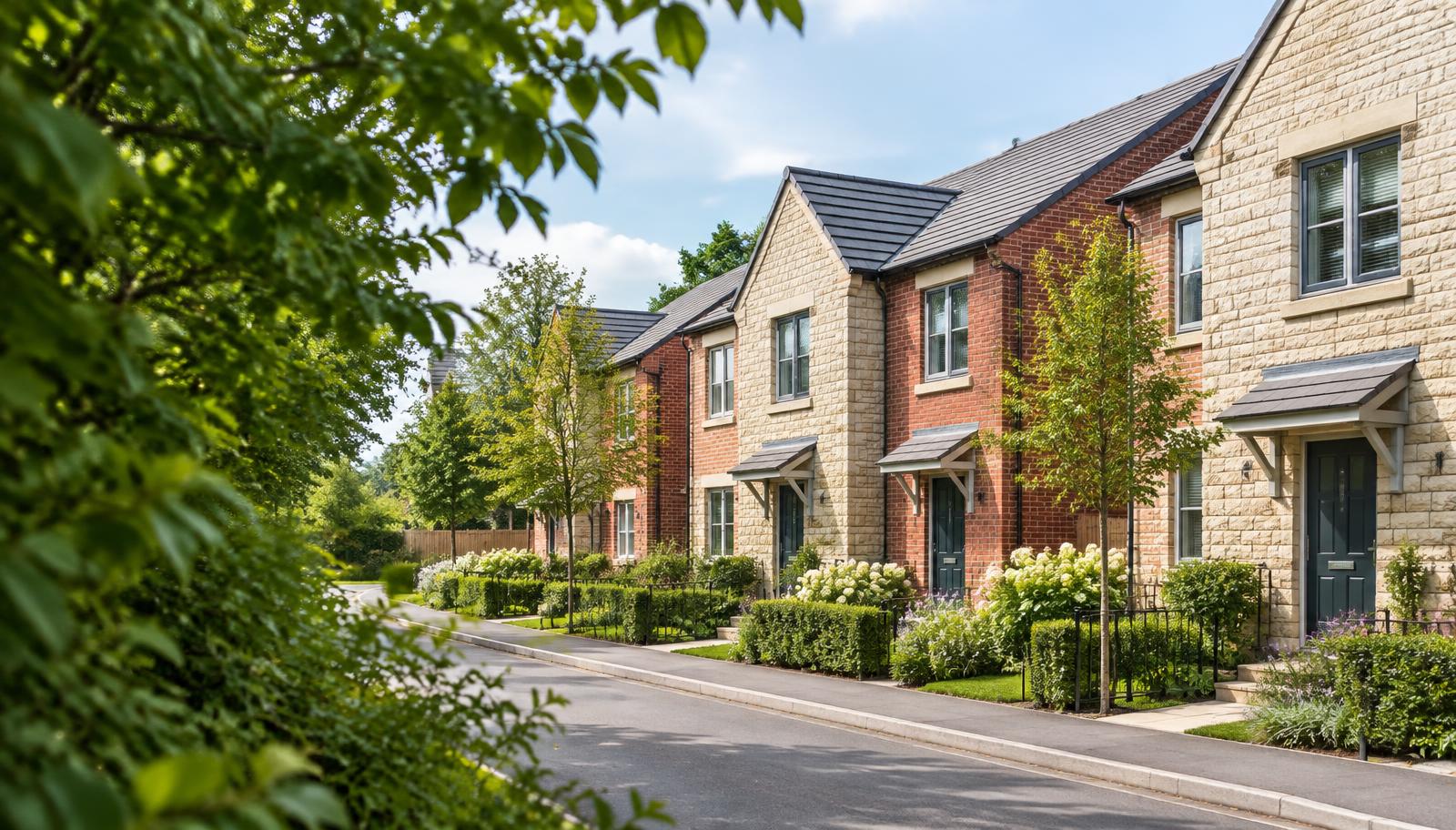
Illustrative English residential street with terraced homes and gardens

Portfolio project · Fictional demonstration

Clear Ground Accommodation Suitability Tool

Building on my experience of creating an earlier accommodation-suitability tool, I built a new version from scratch with newly written code.

This project explores how a structured workbook can help officers bring together household circumstances, property evidence and their reasons when assessing accommodation suitability within statutory homelessness work.

Fictional demonstration only. Not for operational use, legal advice or automated decision-making. The officer remains responsible for the assessment. Urgent assistance, safeguarding action and deadlines must not wait for use of this demonstration.

ABOUT THIS PROJECT

The problem

Relevant information can be spread across records, while the reasons for an assessment need to be clearly explained.

The approach

Bring household circumstances, property evidence, unanswered questions and officer reasoning into a structured record.

The implementation

Standard Excel and enhanced VBA-enabled editions, alongside this separate web demonstration.

The limitations

This demonstration illustrates the intended workflow. Formula calculations and printed layouts were checked in an office suite with zero errors, but the VBA has not been run in Excel and legal accuracy is not validated.

FICTIONAL DEMONSTRATION · CG-DEMO-001

A guided walk through one fictional case.

Fixed fictional information only. Nothing is requested, uploaded, stored or calculated, and this page is not connected to the workbooks.

Household · Proposed accommodationIllustrative interface

Step 1 of 4

Fictional case CG-DEMO-001

Suitability concerns the relationship between the accommodation and this particular household, not the property in isolation.

Fictional household

  • Adult with one child aged 7
  • Child has asthma (fictional GP letter referred to)
  • Child attends a primary school in the current area
  • Adult works part-time locally

Proposed accommodation

  • Two-bedroom private rented flat, second floor
  • Approximately 40 minutes by bus from the school
  • Rent stated by the landlord; household income partly verified

All details are fixed and fictional. No information is requested or stored.

TWO EDITIONS

How the workbooks are designed.

The project includes a standard edition without macros and an enhanced VBA-enabled edition with additional recording and export features.

No macros

EDITION 01

Standard edition — no macros

A formula-led workbook that brings household circumstances, property evidence and officer reasons into one structured record.

  • Household circumstances and proposed accommodation
  • Property evidence and unanswered questions
  • Officer findings and reasons
  • Summary, draft letter and dated Resources

Formula calculations and printed layouts were checked with zero errors in an office suite. Desktop Excel evaluation is part of owner testing.
VBA-enabled

EDITION 02

Enhanced edition — VBA-enabled

Adds VBA-enabled recording and export features to the standard edition.

  • Everything in the standard edition
  • Save-to-log and override audit actions
  • Summary and letter PDF export actions
  • New-case reset and override checks

Formula calculations and printed layouts were checked with zero errors in an office suite. The VBA has not been run in Excel yet; execution is part of owner testing.

PORTFOLIO · NUMBERED WORKSHEET PLAYTHROUGHS

The anticipated officer workflow.

Genuine v3 worksheet views with encircled field-by-field numbers. Fictional case CG-DEMO-001 remains incomplete. These are animated LibreOffice sheet exports, not recordings of desktop Excel; appearance there may differ. No real case data is used.

Standard edition — no macros

22 numbered actions · Anticipated manual workflow

3:13.5
Read the numbered walkthrough
  1. Start · ①. Read the Start sheet and its limitations before entering the fictional case.
  2. Case Details · ②–③. Record case and household context in B9:B17, then the proposed accommodation in B23:B27.
  3. Resources · ④–⑤. Check the source date and verify the official sources and their applicability at the decision date.
  4. Assessment · ⑥–⑪. Work through rows 6–19: F risk, G mitigation, H implementation evidence; L override, M reasons and N qualification. Review P and add C31 notes. Eleven fictional categories remain unassessed.
  5. Legal Checks · ⑫–⑮. Record route, tenancy and landlord scope, Awaab’s Law and Renters’ Rights applicability, notices and review rights. B18 remains Further evidence required; B19 records the outstanding questions.
  6. Summary · ⑯–⑰. Review B41:B44 and incomplete categories. Indicative RAG does not determine suitability or discharge.
  7. Letter · ⑱–⑲. Review Include/Omit choices in C12:C20 and officer text in D. B12:B19 remain DRAFT BLOCKED because the sample is incomplete. Do not issue it.
  8. H-CLIC · ⑳. Review indicative mappings against the current specification. Nothing is submitted.
  9. Save and print · ㉑–㉒. Anticipated manual Excel actions: save a separate .xlsx case copy, inspect print preview or PDF and review outputs. Excel’s own screens are not recorded. The Standard edition has no macros, Case Log or Dashboard.

Enhanced edition — VBA-enabled

29 numbered actions · Anticipated VBA workflow, not tested execution

3:06
Read the numbered walkthrough
  1. Set up automation · ①–⑥. Check IT policy; save an owner copy as .xlsm; Alt+F11, File → Import File, select ClearGround_Suitability_Macros_v2.bas. Save and enable macros only if permitted. Alt+F8 runs macros; InstallButtons is optional and not shown as already installed.
  2. Case and Assessment · ⑦–⑬. Enter Case Details B9:B17 and B23:B27. Work through Assessment F risk, G mitigation, H evidence, L override, M reasons, N qualification and P checks. This fictional case assesses only three categories.
  3. Legal Checks and sources · ⑭–⑯. Record legal scope, route, evidence and notices in B6:B20, B18 finding and B19 reasons. Verify dated Resources and applicability. The finding remains Further evidence required.
  4. Summary and Letter · ⑰–⑱. Review Summary B41:B44. Letter B12:B19 remain blocked on this incomplete case; no formula or macro issues a letter or discharges a duty.
  5. CheckOverrides · ⑲. Anticipated Alt+F8 action: CheckOverrides examines Assessment P6:P19 for entries beginning NOT. It checks recorded override status, not legal validity; VBA is untested.
  6. SaveCaseToLog · ⑳. Anticipated action: requires Case Details B9, recalculates and appends a snapshot. The baseline log has headers only.
  7. Log snapshot · ㉑–㉒. Manually populated anticipated result, not VBA execution: timestamp, ref, applicant, officer, finding, indicative RAG, score, category counts, overrides, type, location and children. Every save appends a new row; repeat saves are duplicates, not updates.
  8. Dashboard · ㉓. Baseline totals are zero. Anticipated result: one saved case, zero Suitable, zero overall Red/Amber/Green because the record is Incomplete, and one out-of-district placement. This is not an observed macro result.
  9. Audit · ㉔. SaveCaseToLog records rows where Assessment P equals Override applied. No overrides in this sample means no added audit rows. The audit is neither immutable nor live edit history.
  10. ExportSummaryPDF · ㉕. Anticipated export: CG-DEMO-001_summary.pdf beside the saved workbook. Review the PDF manually; export has not been run in desktop Excel.
  11. ExportLetterPDF · ㉖–㉗. The macro can export blocked letter text; export is not approval. Do not issue this sample. Review every output manually.
  12. NewCase and save · ㉘–㉙. NewCase asks for confirmation, clears case inputs and legal entries, resets G to No and L to None, and retains Case Log, Audit and council details. Save the .xlsm to persist the log. No VBA execution is claimed.

Instrumental music, no voice-over; English captions and numbered written walkthroughs accompany both videos. These are rendered drafts for review: selected still frames were checked, but motion, transitions and audio have not been reviewed end to end. Some Standard Assessment markers partly cover neighbouring values; some Enhanced Assessment and Letter guidance is small, and its music loops may be audible.

The Enhanced Case Log and Dashboard results are explicitly anticipated: the sample row was filled in by hand, not by VBA. Dashed duplicate-row and empty-audit outlines are labelled video illustrations. No working files or VBA code are served. Formula and printed-layout checks were in an office suite; VBA execution remains owner testing in desktop Excel.

PORTFOLIO · WORKBOOK SHEETS

Inside the standard workbook.

Illustrative images of the actual workbook sheets, filled in with fictional sample data for case CG-DEMO-001. They were printed from LibreOffice, not desktop Excel, so the appearance in Excel may differ. No real records, VBA code or confidential material are shown.

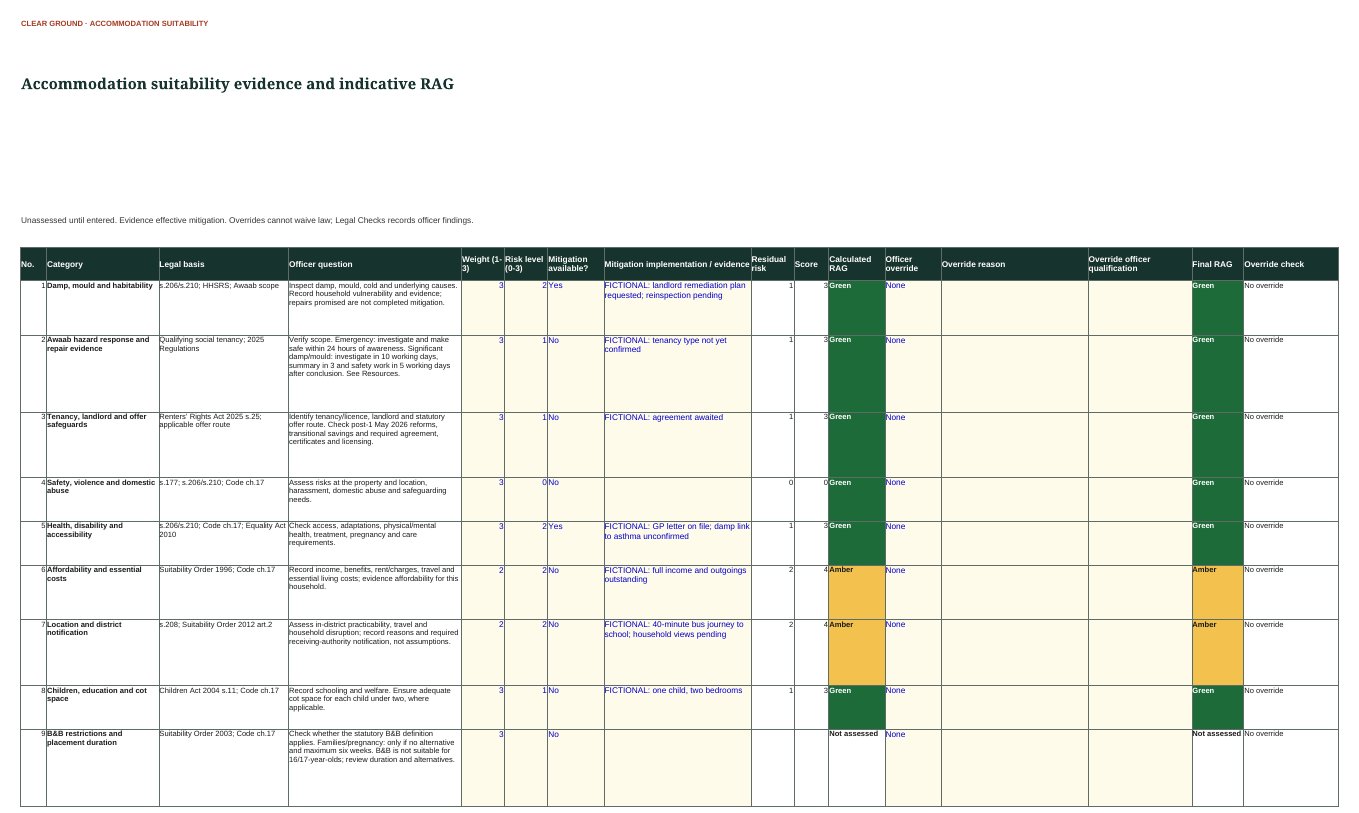
Assessment sheet showing suitability categories, legal basis, officer questions, risk, mitigation evidence and indicative RAG for fictional case CG-DEMO-001
ILLUSTRATIVE · FICTIONAL DATAAssessmentCategories, evidence and an indicative RAG rating. The rating is not a suitability decision.
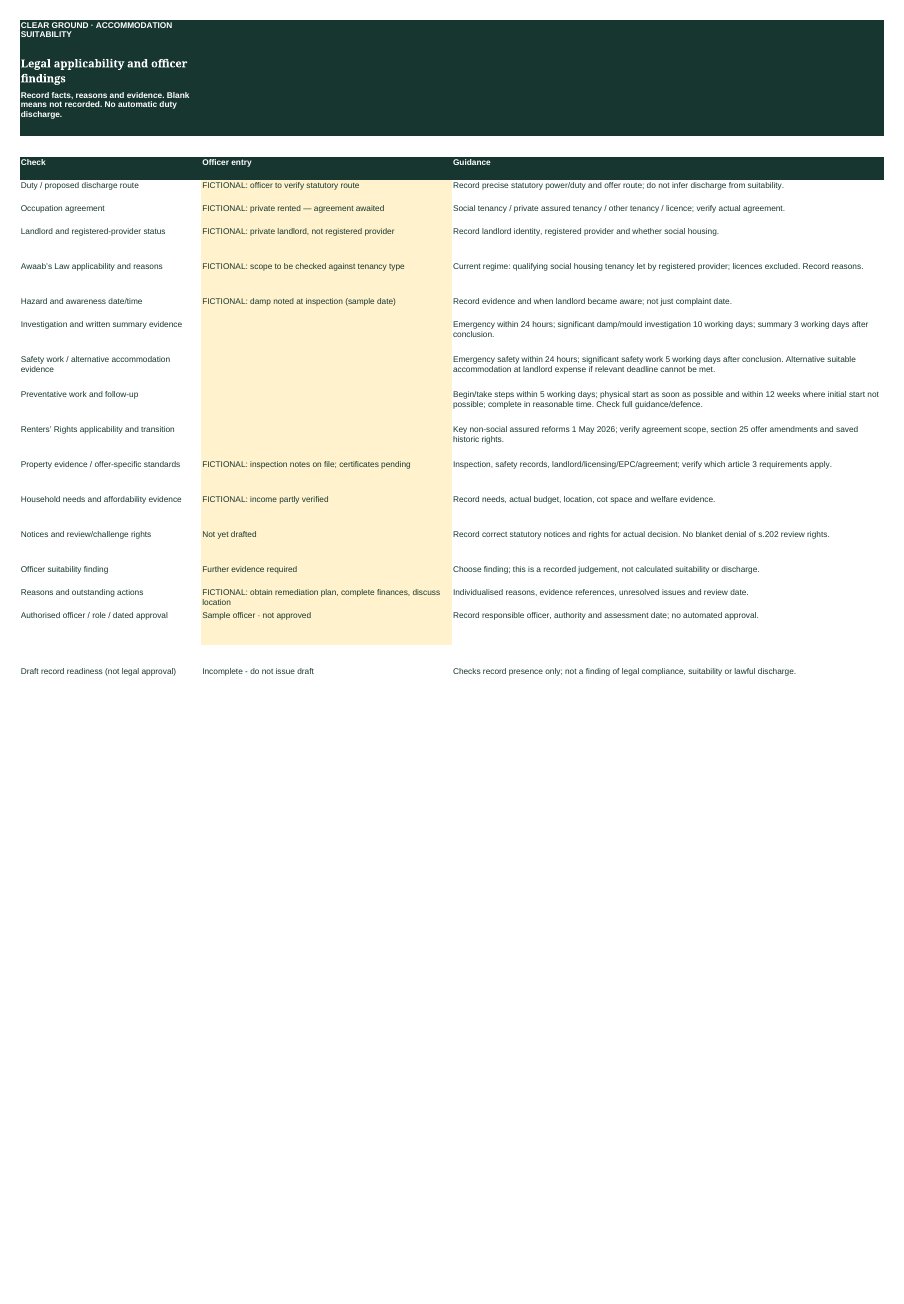
Legal applicability and officer findings sheet with fictional entries and the officer finding recorded as further evidence required
ILLUSTRATIVE · FICTIONAL DATAOfficer findingsLegal applicability checks and the officer’s finding, recorded as “Further evidence required”.
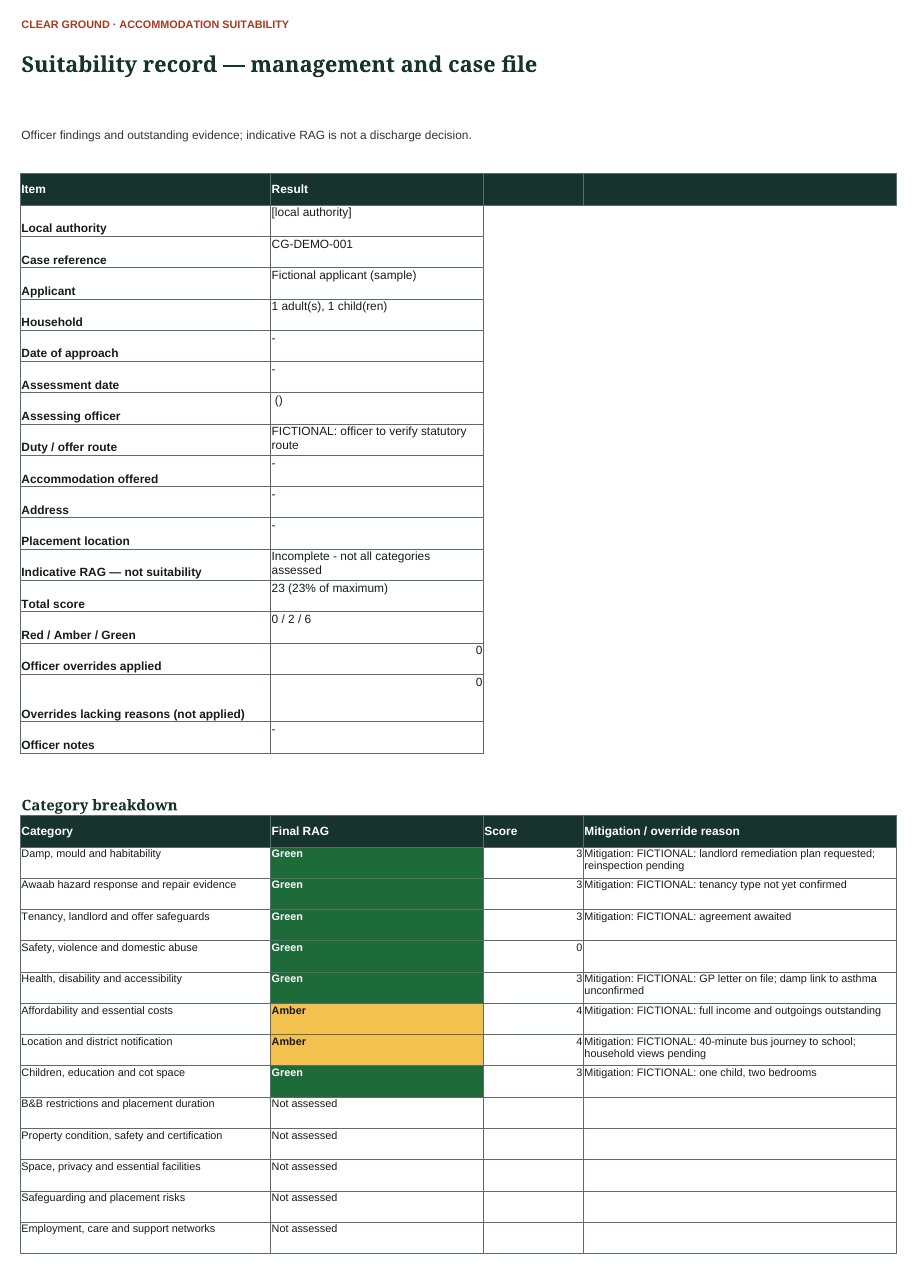
Suitability record summary for fictional case CG-DEMO-001 with category breakdown
ILLUSTRATIVE · FICTIONAL DATASummaryThe management and case-file record, showing incomplete categories.
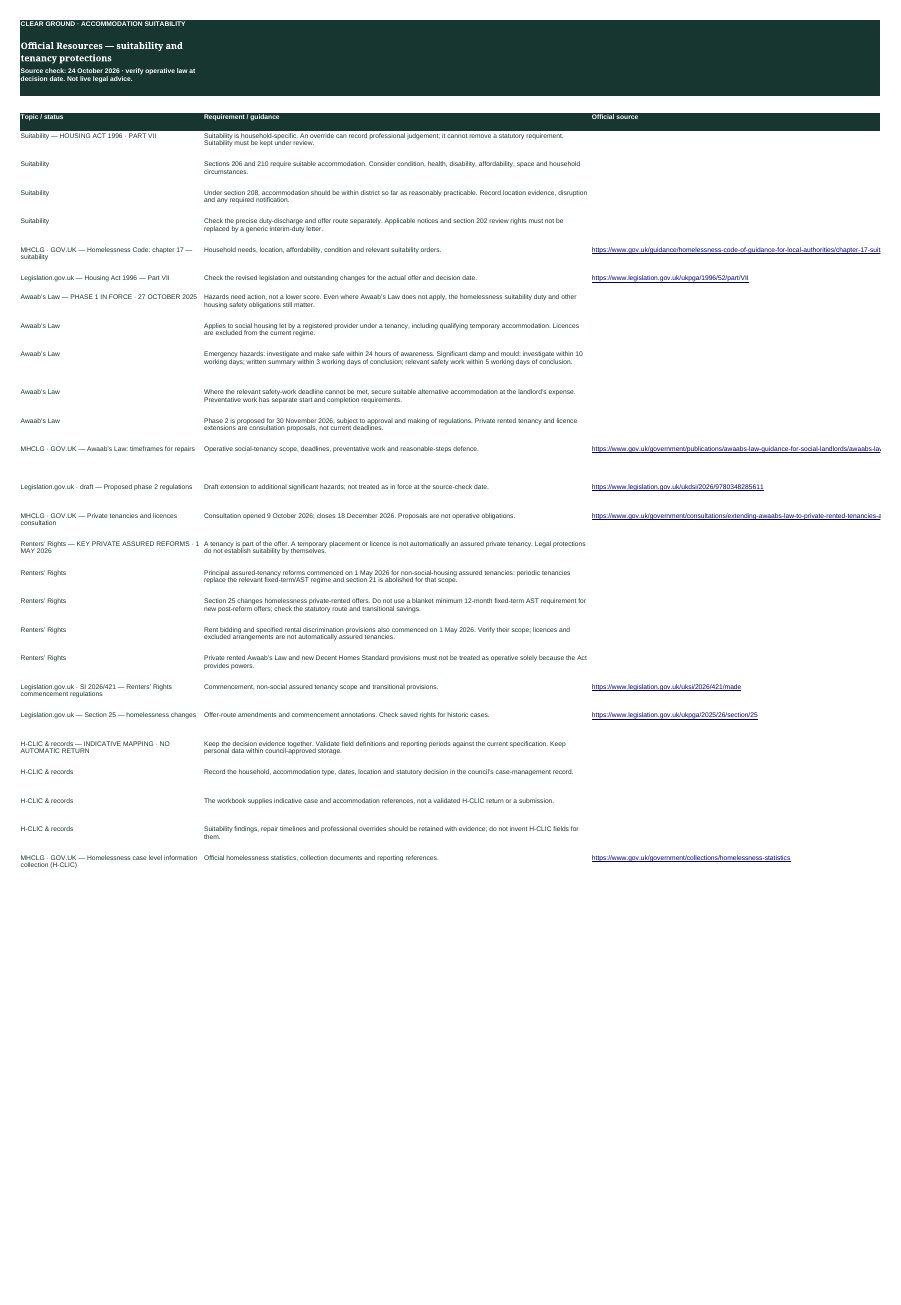
Resources sheet listing dated official legal sources
ILLUSTRATIVE · FICTIONAL DATAResourcesDated official sources. Not live legal advice.

LEGAL FRAMEWORK & RESOURCES

The right rules for the right offer.

Source check · 24 October 2026

Suitability applies across homelessness accommodation. Repair and tenancy protections depend on the landlord, tenancy, offer route and provisions in force.

HOUSING ACT 1996 · PART VII

Suitability is household-specific.

  • Sections 206 and 210 require suitable accommodation. Consider condition, health, disability, affordability, space and household circumstances.
  • Under section 208, accommodation should be within district so far as reasonably practicable. Record location evidence, disruption and any required notification.
  • Check the precise duty-discharge and offer route separately. Applicable notices and section 202 review rights must not be replaced by a generic interim-duty letter.

An override can record professional judgement; it cannot remove a statutory requirement. Suitability must be kept under review.

Boundaries

Fictional demonstration only. Not for operational use, legal advice or automated decision-making. The officer remains responsible for the assessment. Urgent assistance, safeguarding action and deadlines must not wait for use of this demonstration.

Suitability is separate from the statutory offer or discharge route, notices and review rights, which require verification. The demonstration does not produce a suitable or unsuitable verdict or a compliance score, and this website does not run Excel calculations or VBA.

Formula calculations and printed layouts have been checked in an office suite with zero errors. Running the VBA in desktop Excel, and a final check of the printed pages there, are part of owner testing. Legal source status is dated, not live legal advice. This page aims for WCAG 2.2 accessibility; no formal accessibility audit is claimed.